Notes on Modular Synthesis

Wft:

These synths work by voltage (in the physical world; digital ones use simulated voltage). When you play a guitar or piano, you're playing different notes by pressing different keys, and each fret or key sounds in its own frequency, high or low. Synths use voltage (higher or lower) to designate a sound. When you increase voltage, you create a high pitched sound; when you decrease voltage going in, your sound becomes lower pitched. They use voltage (higher or lower) to do everything else, too, such as voltage controlled oscillator (making the oscillator pulse more or less rapidly by increasing or decreasing the voltage going in to it) or a voltage controlled filter. If you pump a high voltage into an oscillator, you'll produce a high note. If you put low voltage into a different oscillator (producing a slow transition between its high and low points of oscillation), then push that oscillator into your first high pitched oscillator (thereby controlling your high-frequency oscillator with your low-frequency one), you'll have a high pitched sound, but it will go higher and lower at the rate of your low-frequency oscillator, warbling.

In order to make a sounds, you need 1) an amplifier. This is the last module in your chain of patch cords conveying your signals. On a digital modular synth, this might be called "out," 2) an oscillator which produces a sound wave; 3) something to control the frequency going into the oscillator, which could be a midi keyboard, a step sequencer with some notes selected (which will also require a clock in front of it so it actually moves), or a knob that you turn up or down to increase or decrease frequency for your oscillator. First in your chain is your voltage (frequency) controller (keyboard, clocked sequencer, or knob), second is your oscillator which actually produces your sound wave, and finally your amp which can turn the frequency signal into sound waves.

Basics for a synth played with computer keyboard:
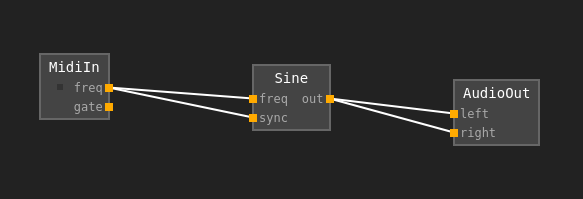
Image

Basics for no keyboard (using a sequencer):
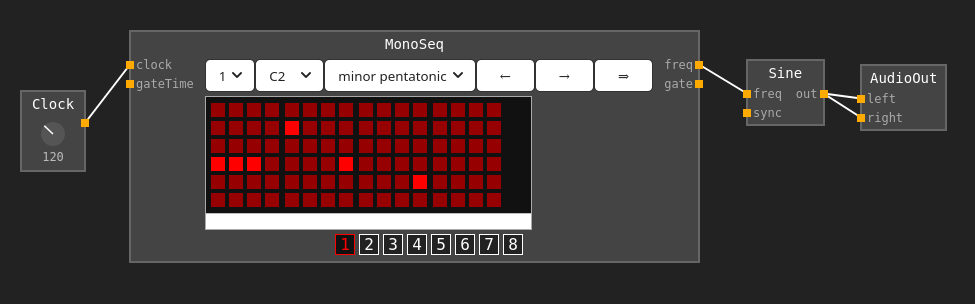
Image

These were made using a browser synth: https://z.musictools.live/

How much voltage does what? Each octave means a different volt. 1 volt might make middle C. 2 volts then will make C one octave higher. Each note is therefore 1/12th volts different from its neighbour. Synths with keyboards do this stuff in their own wiring.

Gates. This means turning a sound on and off. They're used to start "envelope generators," starting and controlling sequencers and switches. Tapping a key, for example, means turning a switch on and off, although on a keyboard you probably won't have control over this (it will be built in).

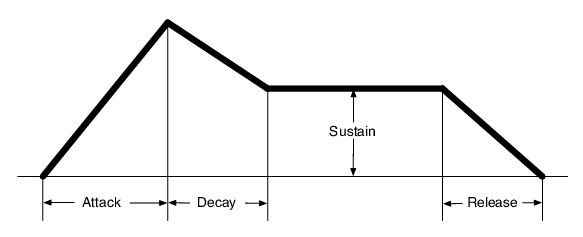
Envelopes (the label for the component might saw "envelope generator" or "adsr") control 3 things: amplitude, pitch, and harmonics. But when you look at the knobs on an envelope, you don't see those words; you see 4 other words, which you can adjust: attack, decay, sustain, release. Forget pitch and harmonics right now, and we're going to consider an envelope that just controls amplitude (volume) of each note you press. If a note is tapped, you only have to worry about 2 things: attack and release. Attack is how quickly the sound "fades in" to its maximum volume, and release is how quickly the sound fades out after the key has been released. But your note is not going to keep "attacking" after you released the key; it's only going to attack as high as you give it time for with your short key press, and if that time isn't enough to get to it's high point, it won't get to it's high point. Now If you plan on holding the note, you have two other things to think about: when you press and hold your key, and the key reaches it's maximum volume (decided with "attack"), does it decrease in volume a bit before holding it's sound? This decrease is called "decay," where you're still holding the key and it's going to sustain, but it's going to come down a bit before it sustains. Sustain is, when holding the key, what volume it plays at for as long as you hold it or until it's sustain time runs out. When you release your key, you'll hear your "release" parameter as the sound fades out afterwards.
Image

How to build a system:

Terms to Know (from https://www.synthesizers.com/begin.html )

  • Amplifying - Increasing a signals volume.
  • Analog - A signal that varies continuously.
  • Attenuating - Lowering a signals volume.
  • Control Voltage - .
  • Controller - A device that creates signals used to control modules. Examples: keyboard, wheel, ribbon.
  • Digital - A signal comprised of numerically computed values.
  • Envelope - A waveform that changes over time used to control parameters of a signal such as filtering and amplitude.
  • Gate - On/Off signal typically from a keyboard indicating a key is pressed. Used to trigger envelope generators.
  • Inverting - Reversing of the polarity of a signal.
  • Mixing - Combining of several signals. Technically, adding of voltages.
  • Module - An component of a synthesizer that performs a function, typically with an audio signal and/or control voltages, and can be moved to other locations within the system.
  • Monophonic - A system where only one note can be played at once. However, this note may contain many pitches from multiple oscillators.
  • Normalized - A synthesizer where most of the patching between functions is fixed. Example: MiniMoog.
  • Patch - A set of patch cables and module parameter settings used to create a specific sound.
  • Semi-Modular - A synthesizer where functions are logically separated and patchable, but modules are fixed into one location. Example: ARP 2600.
  • Sequencer - A component of a synthesizer that creates a series of voltages typically used to control oscillators, filters and other modules.
  • VCO - Voltage Controlled Oscillator. Creates waveforms. Frequency/Pitch is determined by knobs and pitch control voltage.
  • VCF - Voltage Controlled Filter. Removes harmonics from waveforms. Frequency is determined by knobs and control voltages.
  • VCA - Voltage Controlled Amplifier. Controls amplitude (volume) of a signal. Amplitude deterimed by knobs and control voltages.
  • Voltage Control - The concept where parameters are determined by voltages.

Tutorials here: https://www.synthesizers.com/tutorials.html

TTTThis

The transit system here is better than in my country

In this city theres a train line that services the city north-south. For paying for fares there are two options: one is buying a card that has four rides worth of value on it. The other (for citizens) is to buy a card you can recharge). You buy these at booths from people inside the station building/area. The four-rides option is a plastic credit-card style card.

To enter the train terminal, there are turnstyles with card readers. You place your card against the reader. A screen beside it displays how much value you are charged and how much remains. If it is the last of four rides, it tells you to insert the card (instead of keeping it in your hand as you enter). Then the turnstyle is unlocked and you pass through. There are transit workers here which can see no one is jumping over the turnstyle.

Image

Now you ride the train as much as you want until you exit a turnstyle at any station. There is a flat rate for taking the train anywhere and for any amount of time. You do not scan your card when you exit. You just exit. Therefore if you lost your ticket on the train you wont have a problem exiting.

The security workers for the train are therefore not tasked with 'policing' or 'checking tickets.' There is no uncomfortable and irritating ticket checks. There are no fines or the cost of processing fines. The workers who would be checking tickets and 'policing' in my country are here allowed to service the customers ie offer information and directions when asked and ensure physical safety and security.

The experience is easier and more comfortable and less aggravating. The cost of running this type of system appears to be much less because it involves less problems to have to deal with and perhaps less workers - in any case, the workers appeared to me of more value than the 'ticket checkers' etc in my country's city trains.

TTTThis

Risograph Printing

From what I've learned (I met some people in their riso printing studio the other day and learned the process and made some test prints), what can be done on risograph can be done on the regular photo service store printers, so I don't know if riso is that valuable.

The guys at the studio make their money from medium-sized runs (between 50 and a thousand or two) because its most cost effective than a photo studio but less so than (i forget the word but the machines used for bigger print jobs).

one thing is you have to do runs with riso, generally of 50 or more.

riso printers look like regular photocopy printers. there are four color drums (pink, blue, yellow, black). only one drum is in the machine at a time. you do your run with that color, then swap the color drum and print that color on the same pages. sometimes the color from one drum is still there for the next pages, so it can leave bands of color across the print (unfortunately). also, the first prints are less evenly colored (and darker generally) than the ones that are printed later on. The prints dont line up exactly. they can be adjusted i guess, somewhat like a lithograph machine, but i think less exactly. so sometimes your colors wont be lined up.

Image

to make other colors, two or more colors are mixed. the effect is good, though. Yellow and pink can make a bright, even orange.

The machine can add textures. There are two options. One is 'Screen tone' which is like dots like in Archie comics, and you can control the size of the dots (and spacing therefore) and the angle of the dots. The other option is 'grain touch' which is a patternless color fill that can look like charcoal rub when its not applied strongly.

The maximum size the machine can do is 11x17.

In order to prepare images to print, the images must be separated into the 4 colors (which each are saved as a greyscale image) to print. The four separate images are printed separately on the same page. One way to prepare these is to use Photoshop and convert the colors to CYNB. This automatically makes four color layers in (i forget the name but one of the) Photoshop window panes. Each of these can be printed (I forget if they have to be converted to greyscale first or if they can just be printed). Another option is to separate the four color phases of your print job into images and save them as a pdf).

Price for 50 prints (4 colors) on 11x7 carta bond 115g paper (fairly thick white paper) is (the equivalent of) $10usd (20 cents each).

TTTThis

Man in Dress Pants 1

Approaching the bench I've been sitting at
In dress clothes, an older man
Like an older man, the white collared shirt perhaps died slightly by a wash with something red,
The grey loose dress pants actually patterned if you look close,
The simple black polished dress shoes and short white grey hair
Slightly hidetan coloured face, slightly hawkish, slightly serious or stern,
A newspaper in his hand
I've been reading a novel and am still drinking the paper cup of tea from the breakfast I just ate here
Hes also going to read I take it 
He comes to the bench
Puts the paper down flattens it out on the bench wood, and sits on it
Is the news that bad today, senior?
That you have to read it with your ass?
TTTThis

Natural Dyes

Natural dyes, for example walnut (hulls or nuts, but I read nuts produce darker dyes) or cutch (which comes from dried and powdered syrup from steeped Acacia Catechu tree wood), may or may not require scouring (preparation of the fabric by distressing/stripping it of natural waxes that protect the fabric from dying) and mordanting (fixing the color).

Generally, cotton (a cellulose based fabric) requires scouring because cotton is naturally waxy and pectin-y. When scoured, the color goes on as a darker, evener dye; when unscoured, the dye goes on in a scratchy, blotchy way. Unscoured dye jobs will not retain color as much as scoured. Cotton fabric that is already bleached may not need as much scouring.

Image

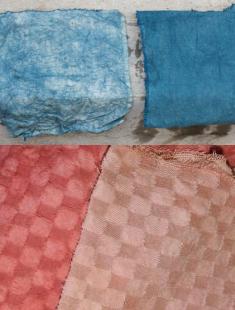
Unscoured and scoured fabrics

To scour cotton, a container is filled with water and Synthrapol (5ml) and soda ash (aka Sodium Carbonate) (20g) is added for each half pound (250g) of cotton, and its simmered for around an hour.

Mordanting is before dying (or as a part of it) with aluminum acetate. There are other methods which use combinations of aluminum acetate and alum or use titanium oxalate. Mixed into water, 7-10g of aluminum acetate for 100g of cotton. The cotton is soaked in just water for two hours or so, then another pot of water is prepared (hot tap water) and the cotton fabric and the aluminum acetate are both added. Gloves are worn so the cotton can be worked and squeezed.

These descriptions of the process give a rough idea, but each dye has its own recipe(s) for how to achieve a good dye (there are various types of 'good dyes' with various color darknesses and tints).

For example, with cutch a deeper dye can be acheieved by first soaking the cutch powder in caustic soda (weak mixture: 1tsp for 4l of water), soaked for a hour, after which more water is added and the mix is neutralized with acetic acid or vinegar, and this is all added to the dyebath. The fabrics are then put in the dyebath and simmered for a couple hours.

Still talking about cutch, various tints can be acheived. Alum mordant causes a toffee brown dye. Iron at 2-4%wof makes chocolate browns. Soda ash rinse will redden the color. Adding 2%wof hydrogen peroxide during the final 15 minutes of dying will darken the cutch considerably. Leaving the fabric in the dyebath overnight will cause the darkest shades.

TTTThis